Platform Features Labels Pricing Support About Contact Blog
Home Features Quotes & Estimations

Win the Work Faster.
Convert It With One Click.

Build staged, professionally branded quotes with live pricing from your own catalogues — then turn an accepted quote straight into a scheduled job with zero re-keying. The commercial half of the loop that runs from win to payroll.

3
Cost Types Per Stage
1
Click to Convert to Job
0
Re-Keying Into Jobs
A,B,C…
Revision Letters on Re-Issue
Quote Header & Details

Every Quote Starts With the Right Details

Capture the client, category, quote type, validity date, tax and any whole-of-quote discount up front. Mark a quote as a Template right from the header, or leave it as a one-off draft ready for stages and line items.

  • Category and quote type pick-lists you control
  • Proposed schedule window feeds the clash check
  • Whole-of-quote discount, percentage or fixed
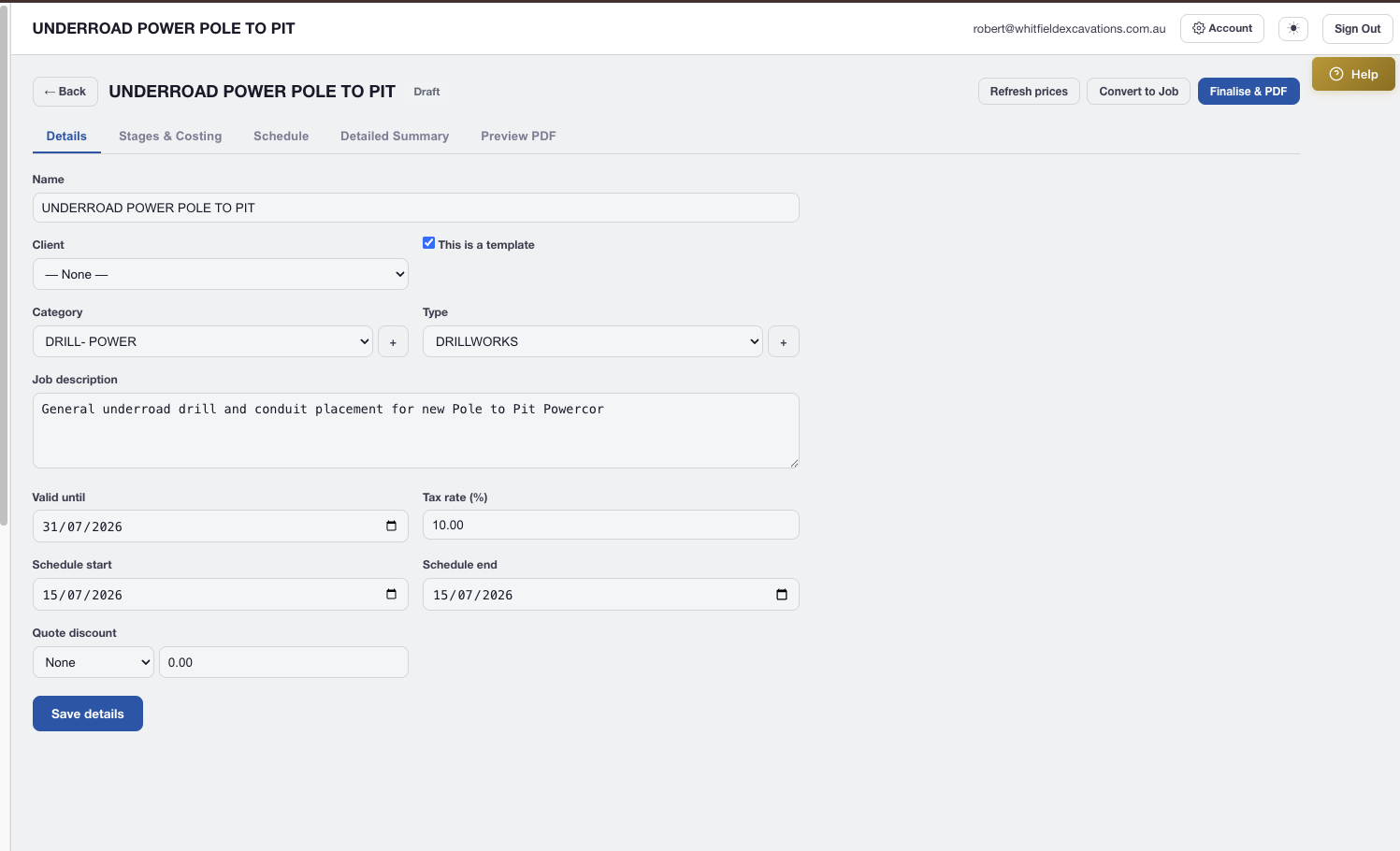
AXITRAQ Quote details tab with client, category, schedule and discount fields
Stages & Costing

Labour, Assets and Materials — Priced the Way You Already Price Them

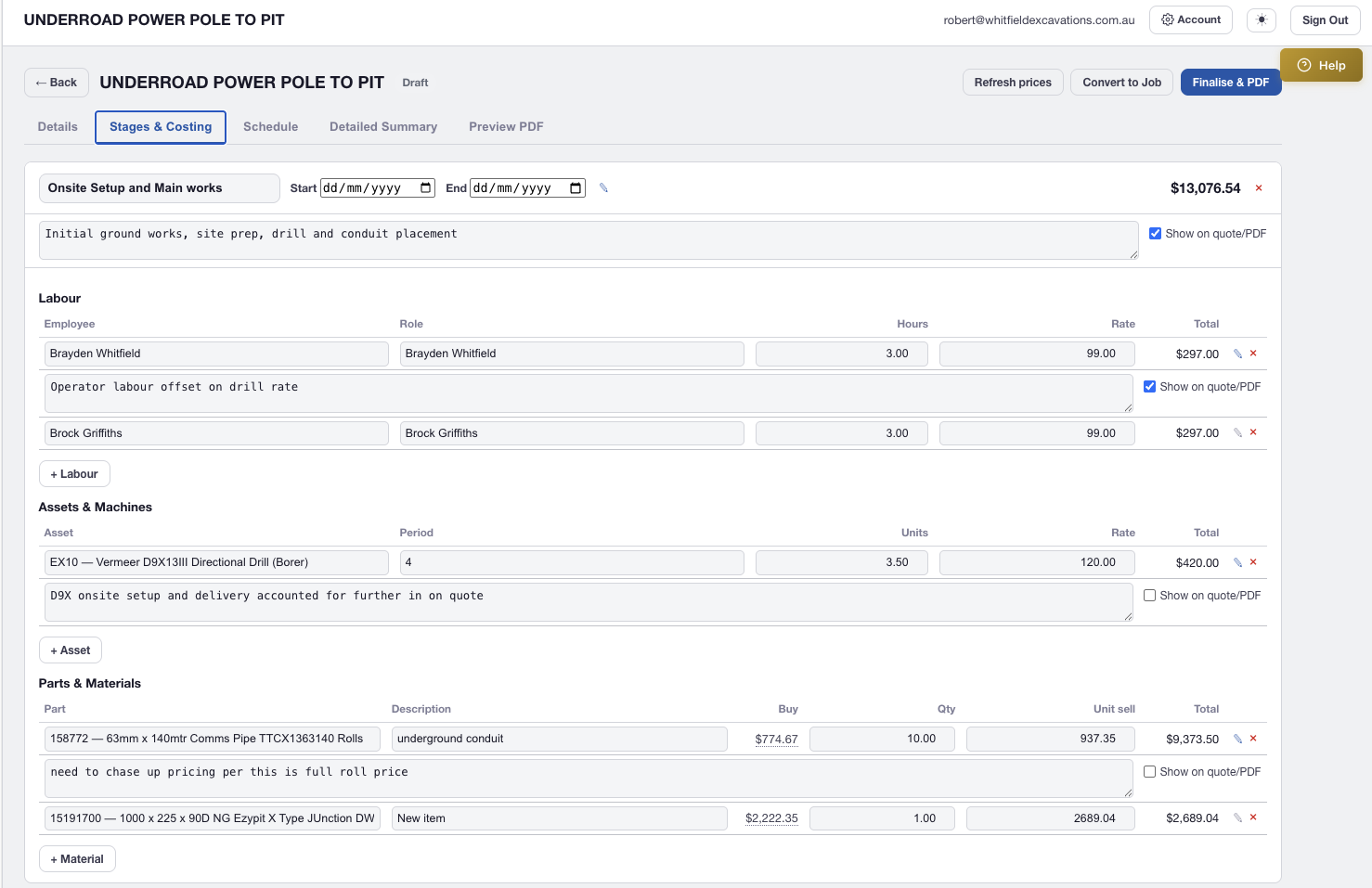
Break a quote into stages (mobilisation, main works, clean-up — whatever suits the job) and price each with labour, asset/machine and material lines. Rates resolve automatically through your existing rate cascade — client override first, then labour type or asset charge period, then the default card — and every rate is overridable on the line.

  • Client-specific labour and asset rate overrides, resolved automatically
  • Buy-cost visibility on every material line for margin checks
  • Per-line and per-stage notes — toggle each one client-facing or internal-only
  • Free-text fallback for off-catalogue labour, machines or materials
AXITRAQ Quote Stages and Costing tab with labour, asset and material lines
Detailed Summary

Review Every Number Before It Goes to the Client

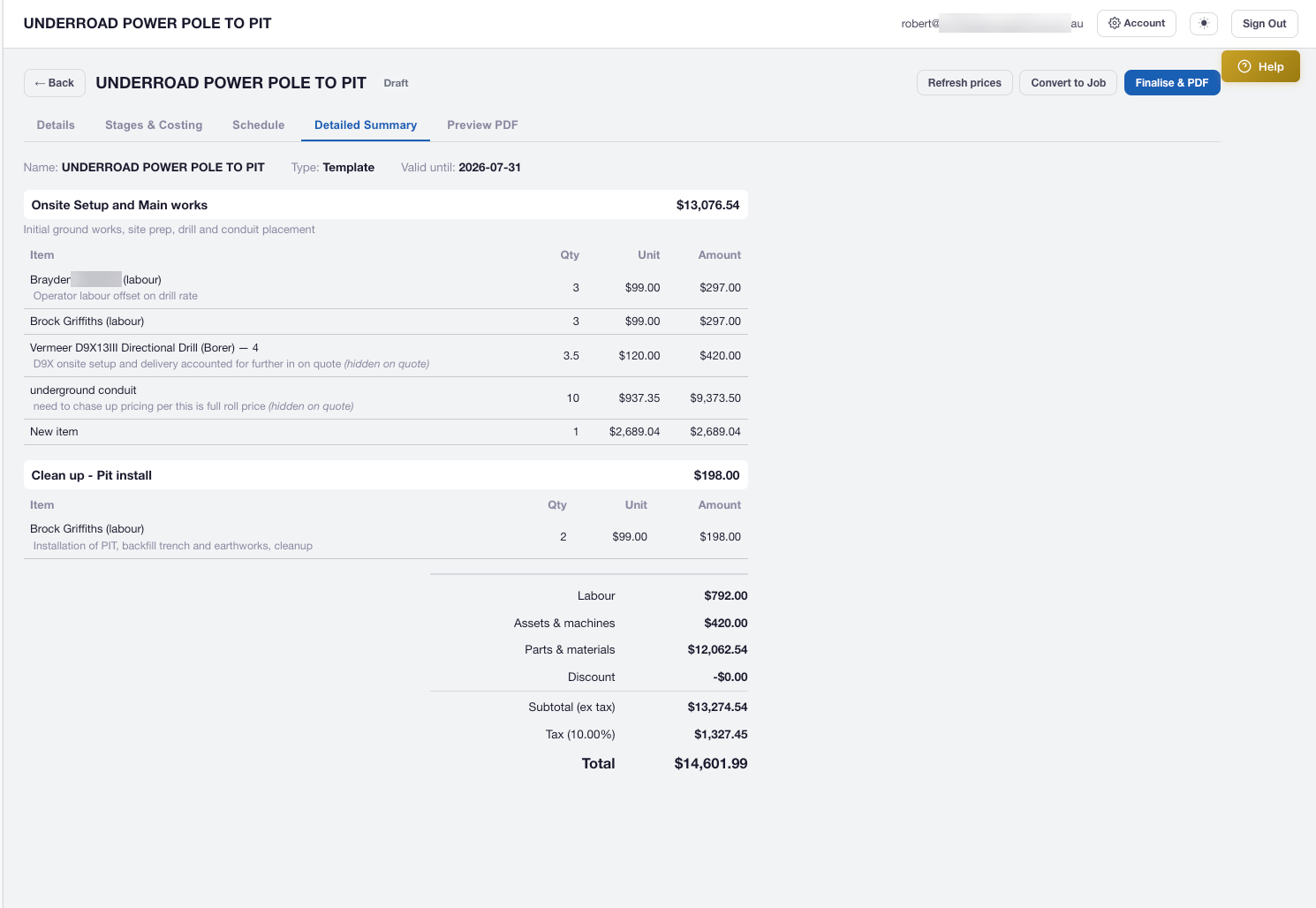
The Detailed Summary lays out every stage, every line, every visible note and every subtotal in one review screen — labour, assets and materials broken out, discount and tax applied, grand total front and centre. Catch a wrong quantity or a missing note before you finalise, not after.

  • Stage-by-stage cost breakdown with live totals
  • Labour, assets & machines, and materials subtotals shown separately
  • Discount and tax applied transparently to the grand total
AXITRAQ Quote Detailed Summary with stage totals and grand total
Branded PDF & Revisions

Your Letterhead. Not a Template With Your Logo Pasted On.

Upload your own designed A4 letterhead and continuation stationery as PDF backgrounds — AXITRAQ places quote content inside a safe area so it never overlaps your logo, address block or footer. Drafts preview with a diagonal PREVIEW watermark and no quote number, so there's never confusion about what's been issued. Finalise to lock in a numbered PDF; re-issue for changes and the revision letter increments (Rev A → Rev B) without losing the original quote number.

  • Configurable safe-area margins to match any letterhead layout
  • Draft PREVIEW watermark — finalised quotes preview exactly as issued
  • No letterhead uploaded yet? A clean built-in header renders instead — you can quote from day one
  • Secure download — never public, never visible to another tenant
AXITRAQ Quote branded PDF preview on uploaded letterhead
Speed to Quote

Quote the Next Job in Minutes, Not Hours

Most trades quote a handful of job shapes repeatedly. Turn the first good one into a template, duplicate a past quote, or snapshot real numbers from a completed job — and start every subsequent quote from there instead of a blank page.

Templates

Mark any quote as a template; turn it into a fresh draft any time with all stages, lines and notes intact

Duplicate

Copy any quote's header, stages, lines and snapshot prices into a fresh draft without touching the original

Start From a Past Job

Snapshot a completed job's real employees, assets and materials into a new quote — ideal for "same again next year"

Schedule & Clash Check

Spot Capacity Problems Before You Quote, Not After

Set the quote's proposed start and finish dates and run an advisory clash check against your active and pending jobs. AXITRAQ lists any employee or asset that's already committed during that window, and links straight to the conflicting job so you can reschedule or swap a resource — before you've promised a client a crew you don't have.

  • Checks proposed employees and assets against overlapping jobs
  • Advisory only — never blocks issuing or converting a quote
  • Links directly to the conflicting job's dates and status
AXITRAQ Schedule and Clash Detection

One Click. Zero Re-Keying.

When a client accepts, Convert to Job creates a scheduled job automatically — the same employees, the same assets, the same materials, aggregated straight from the quote. Nobody re-types an accepted quote into a schedule ever again.

Quote

Staged, priced, branded, sent

Job

Team, assets & materials pre-loaded

Field

QR clock-in, checklists, photos

Timesheets & Materials

Actual cost captured automatically

Complete

Ready for payroll export

Idempotent by design — press Convert to Job again on an already-converted quote and you're taken straight to the existing job. No duplicates, no double-handling, no admin clean-up required.

Ready to Quote
Smarter?

Start your 30-day free trial and take a quote from a blank page to a converted job without a single re-key.